Quola Font Review: A Playful Monoline Typeface for Handmade Products
The moment I dropped Quola onto a candle label mockup, something clicked. I had been searching for a display font that could carry the warmth of a small-batch brand without feeling stiff or overly polished. I needed lettering that felt hand-drawn but not messy, playful but still readable at a glance. Quola delivered exactly that. As someone who spends hours testing fonts on product tags, sticker sheets, and packaging layouts, I can tell you right away: this monoline font has a personality that translates beautifully onto physical goods. It is not just another decorative typeface. It is a design asset that brings a genuine handmade energy to whatever you place it on.
A Font That Feels Like It Was Made for Your Workshop
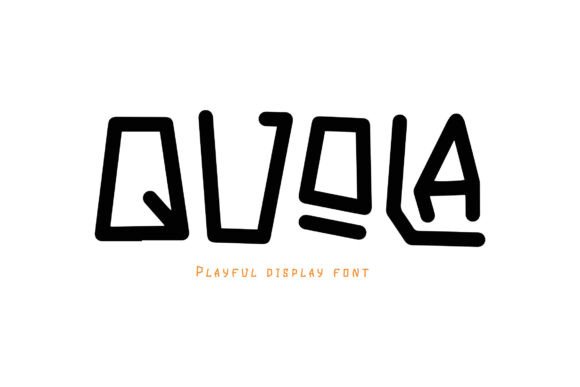
Quola belongs to the display category, and it wears that label proudly. Its monoline stroke keeps the letterforms clean and consistent, while the character shapes lean into a playful, almost bouncy rhythm. When I tested it on a greeting card design, the letters seemed to dance across the paper. That is the kind of energy this font brings. It is not trying to be elegant or serious. It is trying to be fun, approachable, and memorable. For a handmade seller or printable creator, that is gold. Whether you are designing a birthday invitation, a set of planner stickers, or a farmhouse wall sign, Quola gives your words a voice that feels personal and inviting. It has the kind of charm that makes customers stop scrolling and read what you have to say.
I printed a few sample words on sticker paper and cut them out with my cutting machine. The fine monoline cut cleanly, even at smaller sizes. That is important for anyone who works with vinyl, sticker sheets, or layered paper designs. The font holds its shape well, and the open counters stay readable. I tested it on a tote bag design using heat transfer vinyl, and the result was crisp and professional. The playful curves did not get lost in the transfer process. If you sell products that rely on clean cuts and readable text, Quola is a solid choice.
Where Quola Shines in Your Product Line
After testing Quola on several product types, I found it works best for short phrases, names, titles, and decorative wording. It is a display font, so it is meant to catch the eye. I used it for a candle label that said "Cozy Cabin" and the lettering gave the product a friendly, rustic feel without looking like every other candle on the market. It also performed beautifully on a set of gift tags for a holiday collection. The font added a touch of whimsy that made the tags feel special, like something you would want to keep and reuse.
For invitation designers, Quola is a fantastic choice for the main headline or the couple's names. I tested it on a wedding welcome sign mockup, and the playful letters paired well with a simple floral border. It did not compete with the decoration. It complemented it. If you sell digital templates or printable wall art, Quola can become a signature element in your shop. The font has enough personality to stand alone, but it also plays nicely with other design elements. I also used it for a boutique product tag, and the store owner immediately noticed how the font made the branding feel more approachable. That is the kind of feedback that matters when you are choosing a font for your shop.
However, I want to be honest about where Quola may not be the best fit. Because it is a playful monoline display font, it is not ideal for long paragraphs or dense label information. If you need to include ingredient lists, care instructions, or detailed product descriptions, Quola is not the font for that job. The letterforms are too distinctive for extended reading, and the playful shapes can become tiring on the eyes in large blocks of text. Save Quola for the moments that need emphasis: the product name, the tagline, the headline, the decorative quote. Let a simpler font handle the rest. That is how you use a display font effectively.
Readability and Cutting Machine Performance
One of the first things I check when testing a new font is how it behaves on a cutting machine. I loaded Quola into my design software and created a small sticker sheet with individual words. The monoline stroke made it easy for the machine to follow the outlines, and I did not experience any jagged cuts or lost details. The font also worked well on a layered paper project where I needed to stack letters for a dimensional look. The consistent stroke weight made alignment simple. If you sell SVG-style designs or cut files, Quola is a reliable option for your customers.
On printed products like greeting cards and wall art, Quola remains readable even at moderate sizes. I tested it at 18pt on a small tag, and the letters were still clear. At very small sizes, such as 12pt or below, some of the playful details start to blur. For tiny labels or intricate stickers, I recommend using a simpler font for the fine print and reserving Quola for the main text. This approach keeps your design functional while still showcasing the font's personality.
Pairing Quola with Other Fonts for a Polished Look
No font works in isolation, and Quola is no exception. In my tests, I paired it with a clean sans serif font for body text, and the contrast was striking. The playful display font drew the eye, while the simple sans serif provided a calm reading experience. I also tried pairing Quola with a handwritten font for a more casual, layered effect. That combination worked well for a set of planner pages where I wanted a mix of playful headings and personal notes. For a more editorial feel, a simple serif font can ground the playfulness of Quola and give your design a touch of sophistication. The key is to let Quola be the star and choose a supporting font that does not compete for attention.
If you are building a brand identity for your shop, Quola can become the voice of your logo, product names, and social media graphics. Pair it with a neutral sans serif for your website and product descriptions, and you have a cohesive look that feels both professional and approachable. I tested this combination on a mockup shop banner, and the result was inviting without being chaotic. Customers will recognize your brand style, and that consistency builds trust over time.
Licensing, File Formats, and What to Check Before You Sell
Before you use Quola on physical products, digital downloads, or merchandise, it is important to check the included font files and licensing terms. This font comes with a standard set of formats, but you should verify whether it supports the languages you need, especially if you sell internationally. Some display fonts have limited multilingual support, and that can be a dealbreaker for certain products. Also check if the font includes alternates, ligatures, or swashes. These extras can add even more personality to your designs, but they are not always included in every font package.
Commercial licensing is another critical step. If you plan to sell physical products like mugs, shirts, tote bags, or printed stationery, make sure your license covers that use. Some fonts require an extended license for merchandise, while others are fully covered under a standard commercial license. The same goes for digital templates, printables, and SVG-style designs. Always read the license agreement before you start selling. It protects your business and respects the designer's work. I have seen too many makers assume a font is free for commercial use only to find out later that they need an upgrade. Do not let that happen to you. Check the terms, and if you are unsure, reach out to the font creator directly.
Quola has earned a regular spot in my font library. It is versatile enough for a wide range of handmade products, from candle labels to greeting cards to boutique tags, and it brings a level of warmth that is hard to find in more generic display fonts. If you are a crafter, handmade seller, or printable creator looking for a font that feels personal and fun, Quola is worth trying. Test it on a few of your own product mockups, and see how it transforms your designs. You might find that it becomes your new go-to for playful, eye-catching lettering.